


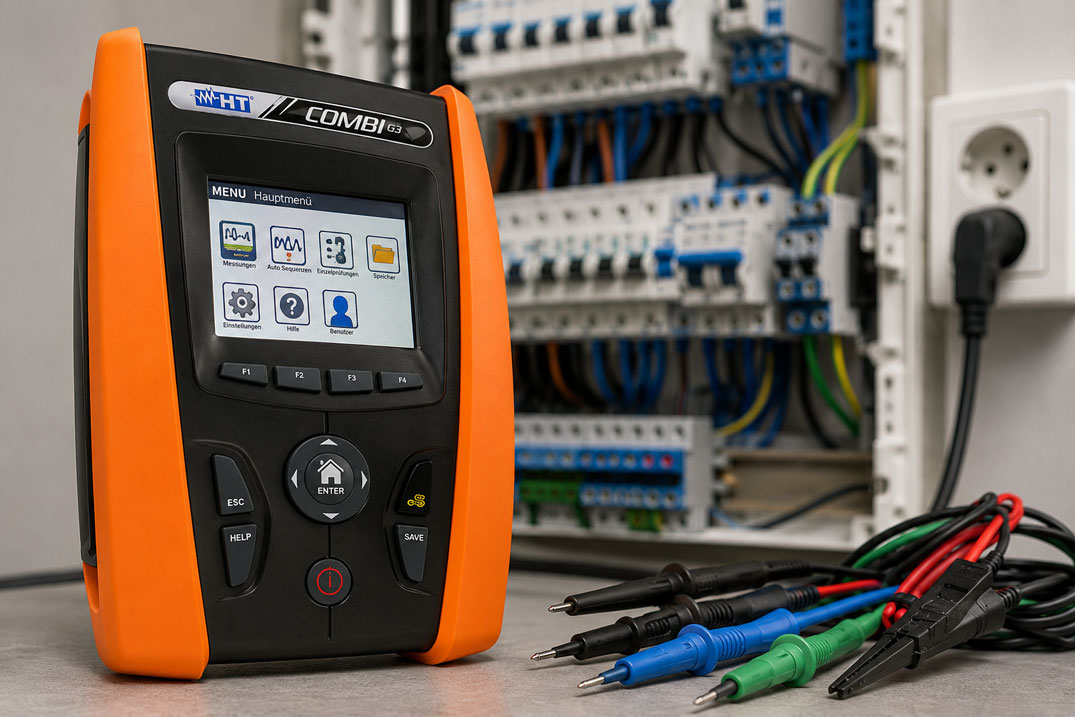
Testing electrical installations in accordance with VDE 0100 is an important part of initial testing, periodic testing and commissioning of electrical installations. In practice, however, it is not only the measurement itself that is time-consuming. The greatest loss of time is often caused by repeated test steps, manual notes, unclear test sequences and time-consuming subsequent documentation.
Especially in larger buildings, industrial plants, sub-distribution boards or many similar circuits, individual measurements can quickly become confusing. If measured values are noted manually, test points are not clearly assigned or measurements are repeated several times, installation testing takes significantly longer.
Modern installation testers with auto sequence, internal memory, USB interface, Wi-Fi or app connection can significantly structure test procedures. This article explains why VDE 0100 tests often take too long, how auto sequences can help and what should be considered when it comes to storage, documentation and device selection.
You can find an overview of suitable test devices in our category
Installation testers / installation testing VDE 0100.
Table of contents
- Why does a VDE 0100 test often take so long?
- Typical test steps in installation testing
- What does an auto sequence do in an installation tester?
- Store measured values instead of noting them manually
- Create documentation and test reports more easily
- When touchscreen, Wi-Fi or USB are useful
- Avoiding errors: measurement sequence, limit values and repeat measurements
- Efficient test procedure in practice
- Which installation testers are suitable?
- Practical examples from electrical installation and industry
- Checklist for faster VDE 0100 testing
- Conclusion
- FAQ: Frequently asked questions about auto sequence, memory and VDE 0100 testing
Why does a VDE 0100 test often take so long?
A VDE 0100 test does not consist of a single measurement. Depending on the installation, network type, protective measure and scope of testing, several measurements must be carried out, assessed and documented. If these steps are not carried out in a structured way, unnecessary time expenditure quickly arises.
In many cases, the problem is not the actual measuring process, but the procedure around it. The tester has to switch between measuring functions, assign measuring points, assess limit values, note results and later create a test report. With many circuits, these steps are repeated again and again.
- Repeated test steps: Each circuit must be tested according to a comparable scheme.
- Manual notes: Measured values are recorded by hand and transferred later.
- Incorrect measurement sequence: Test steps are forgotten or have to be repeated.
- Unclear assignment: Measured values can no longer be clearly assigned later to circuit, room or distribution board.
- Limit values are assessed manually: This costs time and increases the risk of transfer errors.
- Documentation is only created afterwards: The longer the gap after the measurement, the more difficult assignment becomes.
A structured test procedure and an installation tester with memory and auto-sequence functions can significantly reduce these time losses.
Typical test steps in installation testing
Which measurements are required depends on the installation, the protective measure and the test order. In practice, however, certain test steps occur particularly frequently. These include protective conductor resistance, insulation resistance, loop impedance, line impedance, RCD testing, earth resistance, phase rotation and voltage drop.
| Test step | Typical meaning | Time factor in practice |
|---|---|---|
| Low-resistance measurement / protective conductor test | Testing the protective conductor connection with test current. | Many measuring points, lead changes and assignment required. |
| Insulation measurement Riso | Assessment of insulation between active conductors and protective conductor. | Test voltage, conductor combinations and connected loads must be considered. |
| RCD test | Testing residual current devices. | Several RCD types, tripping currents and test conditions are possible. |
| Ra / earth resistance | Assessment of earth resistance or overall conditions depending on the measurement method. | Measurement method and network type must match the test point. |
| Loop impedance / line impedance | Assessment of disconnection conditions and short-circuit current. | Many circuits and measuring points can extend the test time. |
| Phase rotation | Testing the phase sequence at three-phase connections. | Important for machines, motors, pumps and three-phase distribution boards. |
| Voltage drop | Assessment of voltage drop on cables. | Helpful for longer cable runs and load circuits. |
If these measurements are carried out without a clear sequence, repetitions quickly occur. A test device that combines recurring test steps in a meaningful order is therefore helpful.
What does an auto sequence do in an installation tester?
An auto sequence carries out several measurements in a predefined order. The user does not have to manually select the next measuring function after each step. This makes the test procedure faster, more consistent and less prone to errors.
This is particularly practical for recurring tests on sockets, circuits or sub-distribution boards. If, for example, earth testing, RCD testing and insulation testing have to be carried out one after another, an auto sequence can significantly simplify the process.
| Without auto sequence | With auto sequence | Advantage |
|---|---|---|
| Measuring function is selected individually. | Several test steps run one after another. | Less operating effort. |
| Tester has to keep track of the sequence. | Device guides through the procedure. | Lower risk of forgotten measurements. |
| Measured values are noted manually. | Measured values can be stored. | Faster documentation. |
| Limit values are assessed afterwards. | Devices can support OK/NO assessments. | Faster assessment on site. |
| Repeated circuits take a lot of time. | The same sequence can be used multiple times. | Efficient for many similar test points. |
Installation testers such as the
EASYTEST,
the
COMBI519
or the
COMBI521
are particularly interesting when recurring test steps are to be processed more efficiently using auto sequences.
Store measured values instead of noting them manually
A major time waster in installation testing is the manual recording of measured values. If results are noted on paper, they have to be transferred again later. This can lead to transposed digits, missing assignments or incomplete reports.
An installation tester with internal memory can store measured values directly in the device. Depending on the device, results can be assigned to circuits, measuring points, distribution boards or test objects. This makes subsequent documentation easier and improves traceability.
| Problem with manual recording | Advantage of internal storage | Practical benefit |
|---|---|---|
| Measured values have to be noted by hand. | Measured values are stored directly in the device. | Fewer transfer errors. |
| Test points are named unclearly. | Measurements can be stored in a structured way. | Better assignment to circuit and distribution board. |
| Documentation is created with a delay. | Measurement data is immediately available. | Faster report creation. |
| Repeat measurements are difficult to trace. | Stored measured values remain documented. | Better comparability. |
| Follow-up work in the office takes a long time. | Data can be transferred via USB or Wi-Fi. | Less follow-up work after testing. |
Devices such as the
EASYTEST,
the
COMBI521
or the
COMBI G3
are therefore particularly relevant when measured values are not only to be measured, but also efficiently stored and processed further.
Create documentation and test reports more easily
After measurement, the second time-intensive part of the VDE 0100 test often begins: documentation. Measured values have to be transferred into test reports, measuring points described, limit values assessed and results filed in a traceable way.
The better the measured values are structured and stored during testing, the easier the later test report becomes. Devices that can transfer measurement data via USB, Wi-Fi or app are particularly helpful. This allows values to be processed faster and reduces the error rate during manual transfer.
| Documentation step | Typical challenge | Helpful device function |
|---|---|---|
| Transfer measured value | Transposed digits or missing unit | Direct storage in the test device |
| Assign measuring point | Unclear circuit or distribution board | Memory structure with levels or comments |
| Assess limit value | Manual assessment costs time | OK/NO indication or limit value support |
| Transfer data | Manual typing is prone to errors | USB, Wi-Fi or app connection |
| Create test report | High effort after measurement | Exportable measurement data and structured storage |
Important: The best memory function only helps if the tester defines a sensible structure in advance. Rooms, distribution boards, circuits and measuring points should be clearly named before testing.
When touchscreen, Wi-Fi or USB are useful
Touchscreen, Wi-Fi and USB are not just comfort functions. In practice, they can significantly improve the workflow when many measuring points have to be tested and documented.
A large touchscreen can simplify operation because measuring functions can be found more quickly and results can be read more easily. USB is useful when measurement data is to be processed later on a PC. Wi-Fi or app connection can be helpful when measured values are to be transferred directly to a smartphone, tablet or software environment.
| Function | Benefit | Particularly useful for |
|---|---|---|
| Touchscreen | Faster operation and better overview. | Many measuring functions, changing test situations, service calls. |
| Internal memory | Measured values are stored directly in the device. | Many circuits, recurring tests, large installations. |
| USB interface | Data transfer to PC or evaluation software. | Test reports, archiving, office follow-up work. |
| Wi-Fi | Wireless transfer to smartphone, tablet or app. | Mobile documentation, larger test objects, modern workflows. |
| App connection | Measurement data can be processed or shared more quickly. | Service, maintenance, digital testing processes. |
The
COMBI G3
is particularly interesting when a color touchscreen, simple operation and memory transfer via Wi-Fi or USB are important. The
COMBI521
is relevant when Wi-Fi functions, internal memory, USB connection and extended testing tasks such as RCD type B/EV or EVSE test sequences are additionally required.
Avoiding errors: measurement sequence, limit values and repeat measurements
Time loss is often caused by avoidable errors. These include incorrectly selected measuring functions, forgotten test steps, swapped measuring leads, undocumented circuits or measurements that have to be repeated later due to missing assignment.
An installation tester can support the test procedure, but preparation remains decisive. The measurement sequence should match the installation, limit values should be known in advance and test points should be clearly named.
| Typical error | Consequence | Practical solution |
|---|---|---|
| Test steps are carried out in varying order. | Measurements are forgotten or performed twice. | Use standardized sequence or auto sequence. |
| Measured values are stored without circuit reference. | Assignment in the test report is unclear later. | Define clear structure for distribution board, room and circuit beforehand. |
| Limit values are only checked afterwards. | Errors are detected late. | Use device functions with OK/NO assessment. |
| Measuring leads are connected incorrectly. | Measurement has to be repeated. | Use help functions, connection diagrams and plausibility checks. |
| Wrong RCD type is selected. | Test does not match the protective device. | Check RCD type beforehand and select a suitable device. |
| Documentation is only created after a longer delay. | Details about the measuring point are lost. | Store directly, add comments and transfer promptly. |
Efficient test procedure in practice
A fast VDE 0100 test does not begin only when the test device is switched on. A prepared workflow is decisive. The more clearly measuring points, circuits and test areas are defined in advance, the fewer interruptions occur during measurement.
Proven procedure
- Structure the test object: Define building, distribution boards, circuits and rooms in advance.
- Clarify scope of testing: Which measurements are required per circuit?
- Prepare device: Check measuring leads, batteries, memory structure and interfaces.
- Use auto sequence: Run recurring test steps automatically.
- Store measured values directly: Assign results immediately to the correct test point.
- Assess limit values on site: Recheck conspicuous values immediately.
- Transfer data: Process measured values further via USB, Wi-Fi or software.
- Create test report promptly: While setup and measuring points are still fresh in mind.
| Phase | Goal | Helpful function |
|---|---|---|
| Preparation | Clearly structure test object and measuring points | Memory structure, circuit lists, device profiles |
| Measurement | Carry out test steps quickly and repeatably | Auto sequence, help menu, touchscreen |
| Assessment | Detect errors immediately | OK/NO indication, limit value assessment, plausibility check |
| Storage | Secure measured values clearly | Internal memory, comments, level structure |
| Documentation | Create test report faster | USB, Wi-Fi, app, PC transfer |
Which installation testers are suitable?
The suitable device selection depends on whether the main focus is on classic installation testing, extended RCD testing, e-mobility testing, digital documentation or particularly simple operation.
| Product | Especially relevant for | Note |
|---|---|---|
| EASYTEST installation tester with auto sequence function | Fast standard testing according to VDE 0100 | Interesting when auto sequence Ra → RCD → Riso, internal memory and USB connection are the main focus. |
| COMBI519 installation tester with auto sequence and RCD type B | Installation testing with extended RCD requirements | Suitable when RCD tests up to type B are relevant in addition to auto sequence. |
| COMBI521 installation tester with auto sequence, RCD type B, EVSE and Wi-Fi | Extended installation testing, RCD type B/EV and EV charging stations | Relevant when Wi-Fi, internal memory, USB, EVSE test sequences and extended functionality are required. |
| COMBI G3 VDE 0100 installation tester with touchscreen | Comfortable operation and digital data transfer | Interesting when touchscreen, simple operation as well as storage and transfer via Wi-Fi or USB are important. |
You can find a complete overview in the category
Installation testers / installation testing VDE 0100.
Practical examples from electrical installation and industry
Example 1: Many sockets in an office building
In an office building, several circuits with many sockets have to be tested. Without auto sequence, the tester has to switch between measuring functions again and again and note values manually. With an installation tester with auto sequence and internal memory, recurring test steps can be carried out faster and assigned directly to the appropriate circuit.
Example 2: Sub-distribution board with several RCDs
Several residual current devices are installed in a sub-distribution board. If the RCD type is not clarified in advance, incorrect measuring functions or repeat measurements may occur. A device such as the
COMBI519
or the
COMBI521
can be useful when RCD type B or extended RCD testing is also relevant.
Example 3: Measured values must later be entered into the test report
During a larger installation test, measured values are initially noted by hand. Later in the office, it is unclear which value belongs to which circuit. With internal memory, USB transfer or Wi-Fi connection, measured values can be stored in a more structured way and processed faster.
Example 4: Testing EV charging stations
For charging infrastructure, additional test sequences must be taken into account in addition to classic installation testing. A device such as the
COMBI521
is particularly interesting when EVSE test sequences in combination with suitable accessories, RCD type B/EV and digital data transfer are relevant.
Example 5: Service call with changing test tasks
During service calls, requirements often change. Sometimes classic installation testing is the focus, sometimes RCD testing, loop impedance, phase rotation or voltage drop. A clear operating concept with touchscreen, help functions and clear measured value display can relieve the tester and speed up testing.
Checklist for faster VDE 0100 testing
This checklist can be used to prepare and carry out installation testing more efficiently.
| Check question | Why important? | Practical recommendation |
|---|---|---|
| Is the scope of testing clearly defined before starting? | Unclear scopes of testing lead to interruptions. | Define test plan before measurement begins. |
| Are distribution boards, circuits and measuring points clearly named? | This is the only way to assign measured values later. | Define structure in advance and transfer it to the device or report. |
| Can an auto sequence be used? | Recurring test steps are carried out faster. | Use suitable sequence for standard circuits. |
| Are measured values stored directly? | Manual notes cost time and are prone to errors. | Consistently use internal memory. |
| Is data transfer prepared? | Missing cables, software or app delay documentation. | Test USB, Wi-Fi or app before use. |
| Are RCD types and protective measures known? | Wrong measuring function leads to repeat measurements. | Check RCD type A, AC, B, EV and network type beforehand. |
| Are conspicuous measured values checked immediately? | Later remeasurements cost additional time. | Assess limit values and plausibility directly on site. |
| Has the test device been selected to match the application? | Not every device covers all test tasks. | Compare auto sequence, memory, RCD types, EVSE, USB and Wi-Fi. |
Conclusion: VDE 0100 tests become significantly faster with structured procedures
A VDE 0100 test often does not take too long because of a single measurement, but because of missing structure, manual documentation and repeated test steps. Those who clearly structure test objects in advance, use auto sequences and store measured values directly can carry out installation testing much more efficiently.
Modern installation testers support this workflow with auto sequences, internal memory, USB interfaces, Wi-Fi connection, touchscreen operation and digital processing of measurement data. Especially with many circuits, recurring test tasks or extensive test reports, a device that considers measurement and documentation together is worthwhile.
You can find a suitable preselection in our category
Installation testers / installation testing VDE 0100.
FAQ: Frequently asked questions about auto sequence, memory and VDE 0100 testing
How can I carry out a VDE 0100 test faster?
A VDE 0100 test becomes faster when test points are structured in advance, recurring measurements are carried out using auto sequences and measured values are stored directly in the device. This reduces the effort for manual notes and subsequent documentation.
What is an auto sequence in an installation tester?
An auto sequence automatically carries out several test steps one after another. This means the user does not have to select each measuring function individually. This saves time and reduces the risk of forgetting test steps.
What does auto sequence Ra → RCD → Riso mean?
This sequence combines several typical test steps, for example earth or Ra testing, RCD testing and insulation measurement. This allows a recurring test procedure to be carried out faster and in a more structured way.
Why is internal memory useful in an installation tester?
Internal memory enables measured values to be stored directly in the test device. This means values do not have to be noted manually and can later be assigned more easily to a circuit, distribution board or test object.
When is USB helpful in an installation tester?
USB is helpful when measurement data is to be transferred to a PC after testing and processed there or used for a test report.
When is Wi-Fi useful in an installation tester?
Wi-Fi is particularly useful when measurement data is to be transferred mobile to a smartphone, tablet or app. This can significantly simplify the documentation process for larger test objects.
What are the advantages of a touchscreen in installation testing?
A touchscreen can simplify operation, display measuring functions more clearly and speed up the selection of test procedures. This is particularly helpful for devices with a large range of functions.
When do I need an installation tester for RCD type B or EV?
RCD type B or EV can be relevant if corresponding residual current devices are installed in the system or in charging infrastructure. The test device must match the protective devices used and the test order.
How does creating the test report become easier?
The test report becomes easier when measured values are already stored during testing, clearly assigned and then processed further via USB, Wi-Fi or software. This reduces transfer errors.
Which installation testers are suitable for fast VDE 0100 tests?
Suitable devices include, for example, the
EASYTEST,
the
COMBI519,
the
COMBI521
or the
COMBI G3. You can find an overview in the category
Installation testers / installation testing VDE 0100.