


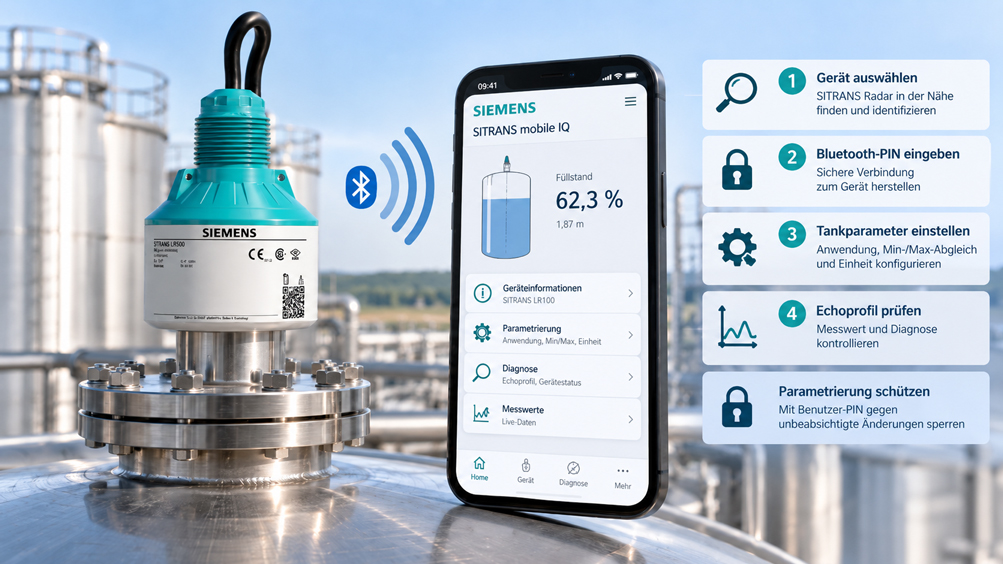
Radar sensors for continuous level measurement are often installed in locations that are inconvenient for conventional local operation. The transmitter may be mounted on a high tank, above a shaft, on a silo or on a vessel that is difficult to access. Climbing directly to the sensor for every small parameter change is neither particularly convenient nor always operationally practical.
The Siemens SITRANS LR100 series therefore combines compact 80 GHz radar technology with wireless operation. Bluetooth-enabled devices can be identified, commissioned, parameterized and diagnosed using the SITRANS mobile IQ app on a smartphone or tablet. In many applications, this allows the operator to remain in a more accessible position and avoids the need to access the field device directly for every parameterization step.
However, Bluetooth only simplifies commissioning if the actual measurement task has first been understood correctly from a technical perspective. An app cannot determine where the tank is truly empty, which reference plane applies to the adjustment or whether a strong echo actually comes from the product surface rather than an internal fitting.
For radar level measurement, the traditional metrological sequence therefore remains essential: First, the installation and application are checked. This is followed by device identification and secure Bluetooth access. Only then are the tank geometry and measuring range parameterized. Finally, the measured value, echo profile, output signal and diagnostics must be checked for plausibility.
The term “safe parameterization” also has two meanings in this context. On the one hand, work at the installation must be carried out safely. On the other hand, once commissioning has been completed successfully, the device should be protected against unintended parameter changes. Siemens therefore separates Bluetooth access from additional protection of the parameterization.
The key point is: Bluetooth does not replace correct installation or professional commissioning of a radar level transmitter. Used correctly, however, SITRANS mobile IQ makes the individual steps significantly easier to access and allows measured values, parameters and diagnostics to be assessed together directly at the actual installation.
Table of Contents
1. What is the function of SITRANS radar?
2. Which devices in the LR100 series are relevant?
3. What Bluetooth actually does during commissioning
4. Check installation and application before opening the app
5. Consider country and radio approvals before commissioning
6. Clearly identify the device and connect via Bluetooth
7. Distinguish Bluetooth PIN from parameter protection
8. Carry out quick commissioning correctly
9. Correctly define the lower and upper adjustment points
10. Select the medium and application correctly
11. Check the echo profile after parameterization
12. Do not suppress false echoes too quickly
13. Use diagnostic values for plausibility checks
14. Do not confuse Bluetooth with the process signal
15. Correctly assess Bluetooth in hazardous areas
16. Document parameterization after commissioning
17. Typical errors during Bluetooth commissioning
18. Select the right SITRANS LR version
19. SITRANS level measurement technology from ICS Schneider
21. Frequently asked questions about Bluetooth commissioning of SITRANS radar
1. What is the function of SITRANS radar?
The SITRANS LR100 family operates according to the FMCW radar principle in the 80 GHz range. The transmitter sends a continuously frequency-modulated radar signal toward the product surface. Part of this signal is reflected by the medium and received again by the antenna.
The device determines the distance to the product surface from the frequency difference between the transmitted and received signal. Together with the parameterized vessel or adjustment data, this is used to calculate the required level, ullage or distance value.
This is an important point during commissioning: The radar initially measures a distance. Whether this subsequently becomes a level of, for example, 72% or an ullage of 1.8 m depends on the selected operating mode and parameterization.
An incorrectly entered tank height can therefore produce a completely stable radar echo while still resulting in an incorrect level value.
Bluetooth does not change this measurement principle. The wireless connection is simply the operating and diagnostic interface through which the user accesses the device parameters.
2. Which devices in the LR100 series are relevant?
The SITRANS LR100 series includes several compact radar versions that use the same basic 80 GHz measurement principle but are designed for different plant requirements.
| Device | Typical application | Important selection features |
|---|---|---|
| SITRANS LR100 | Basic compact level measurement | 4…20 mA version with connection cable |
| SITRANS LR110 | Extended process and tank applications | HART or, depending on version, Modbus and hazardous-area options |
| SITRANS LR120 | Longer measuring distances as well as liquids and bulk solids | Largest measuring range in the series and optional flooding protection |
| SITRANS LR140 | Basic measurement tasks with terminal connection | Compact version with terminal connection |
| SITRANS LR150 | Applications requiring additional local operation | HART, approval options and optional local HMI |
The appropriate version should therefore not be selected solely on the basis of maximum measuring distance. Process connection, temperature, pressure, hazardous-area requirements, output signal, HART or Modbus communication and the desired local operation are also relevant selection criteria.
Bluetooth should also be clearly considered when ordering or checking an existing device. Depending on the version and order configuration, it must be verified whether the required Bluetooth function is actually installed and enabled.
3. What Bluetooth actually does during commissioning
SITRANS mobile IQ provides the user with a graphical operating interface for supported field devices. The app searches for Bluetooth devices within range and displays them in a device list.
After connection, identification data, current device status, measured values, setup functions and diagnostic information are available depending on the respective device.
For the LR100 family, guided quick commissioning is particularly useful. Instead of entering individual parameters exclusively via numbers or menu codes, the most important application data can be entered using a graphical interface.
Diagnostics are equally important. For example, Siemens displays echo profiles for LR radar devices in SITRANS mobile IQ. This makes it much easier to assess on site whether the current level is actually being determined from a reliable product echo.
Bluetooth is therefore more than a convenient alternative to buttons on the device. Its main practical advantage is that parameterization and the actual process situation can be assessed at the same time.
4. Check installation and application before opening the app
Commissioning should not begin by opening the app, but with a mechanical and process-related inspection of the measuring point.
The radar must have a suitable view of the product surface. Internal structures, pipes, ladders, braces or agitators can generate additional reflections. For liquids, the sensor should be aligned appropriately toward the surface wherever possible. For bulk solids, material cones, filling points and changing surface angles must be taken into account.
The sensor should also not simply be aimed directly at the incoming product stream. The radar is intended to measure the product surface, not the falling material.
Mounting nozzles are also relevant. An excessively long or narrow nozzle can influence the radar signal. The narrow beam of 80 GHz technology simplifies many installation situations, but it does not completely eliminate geometric limitations.
Only once the mechanical situation is fundamentally plausible should parameterization be used to optimize the measuring point.
5. Consider country and radio approvals before commissioning
Radar devices operate with high-frequency electromagnetic signals and are therefore subject to country- or region-specific radio approvals.
During commissioning, the operating or frequency setting intended for the relevant installation location must be used.
This setting is not merely a convenience parameter. An incorrect selection can result in the device operating outside the radio parameters permitted in the respective country.
During initial commissioning, it should therefore first be checked whether the regional device setting matches the actual installation location.
This is particularly important for machines and systems that are assembled and parameterized in one country and later exported to another.
6. Clearly identify the device and connect via Bluetooth
After switching on, SITRANS mobile IQ automatically searches for supported Bluetooth devices within range.
In installations with several radar transmitters, multiple devices may therefore appear in the list at the same time. For this reason, the device should not be selected solely on the basis of the strongest radio signal.
Before any parameter changes are made, the device type, serial number and measuring-point assignment must be clearly verified.
Especially in installations with several identical tanks, accidentally parameterizing the neighboring vessel would be particularly critical: The app would function correctly, but the change would be made on the wrong field device.
During the first connection, authentication takes place between the operating tool and the radar transmitter. For the LR100 family, an individual six-digit Bluetooth PIN is used for this purpose.
The corresponding code is provided on the information sheet supplied with the device containing the Bluetooth and parameter access data.
After successful authentication, the device cockpit can be opened and the actual commissioning process can begin.
7. Distinguish Bluetooth PIN from parameter protection
Two functions must be clearly distinguished when considering device security.
The Bluetooth PIN protects wireless access to the field device. It prevents an arbitrary mobile device from accessing or changing measured values, status information or parameters via Bluetooth without authentication.
Separately from this, there is parameter protection. For this purpose, the device can be locked using a freely selectable user PIN.
If this parameter protection is active, the device settings can still be read. However, changes are only possible after the device has been unlocked again.
| Protection function | Purpose | Practical significance |
|---|---|---|
| Bluetooth PIN | Authentication when establishing the wireless connection | Prevents unauthorized Bluetooth access |
| Bluetooth PUK | Restores Bluetooth access | Relevant if the Bluetooth PIN is no longer known |
| User PIN | Locks parameterization against changes | Parameters can be protected against unintended changes after commissioning |
| Device Access PUK | Restores parameter access | Relevant if the user PIN is no longer available |
This separation is very useful in plant operation. A service technician can, for example, check status and measured values without every normal device connection automatically permitting parameter changes.
After commissioning has been completed, it should therefore be checked whether parameterization should be locked in accordance with the plant’s access strategy.
8. Carry out quick commissioning correctly
Quick commissioning in SITRANS mobile IQ guides the user through the fundamental settings required for radar level measurement.
Depending on the device and application, these include the unit, lower and upper adjustment points, required operating mode, material type and application.
These parameters should not simply be copied from an existing measuring point without checking the actual tank geometry.
Errors can occur quickly, particularly after modifications. For example, the sensor may have been mounted on a new nozzle, changing its reference plane. The tank may still have the same overall height, but the distance between the antenna and the process zero point has changed.
Likewise, scaling of a level indication in percent must not be confused with the actual physical measuring distance.
The quick-start wizard speeds up data entry, but it does not replace the determination of the correct plant data.
9. Correctly define the lower and upper adjustment points
For level calculation, the radar requires a clear relationship between the measured distance and the required process value.
The reference plane of the sensor is decisive. For the LR100 family, the measuring range starts at the defined antenna reference. The adjustment distances must be referenced to this plane and not, for example, simply to the top of the tank.
The lower adjustment point typically represents the process condition “empty” or the lower measuring point. The upper adjustment point defines the required upper measured value.
These points do not necessarily have to correspond to the geometrically lowest and highest points of the vessel. In many systems, there may be an unusable residual volume, minimum operating levels, overfill reserves or internal process limits.
The decisive factor is therefore which range is actually intended to represent 0 and 100% in operation.
A common error is to copy values from tank drawings without taking mounting height, nozzle geometry or the actual sensor reference plane into account.
10. Select the medium and application correctly
Radar level measurement is used in a wide variety of processes. A calm water surface places different demands on signal processing than an agitated process vessel with an agitator or a silo containing dusty bulk material.
The selected application type therefore influences the internal signal evaluation and should match the actual application.
For liquids, possible influencing factors include waves, foam, condensation and agitators. In bulk solids, additional effects include material cones, discharge hoppers, dust and changing surface angles.
An incorrect application selection can result in the device measuring in principle but not responding optimally to the process dynamics.
After selecting the application, it is therefore not sufficient to check only a plausible static level. The device should also be observed during filling and emptying.
11. Check the echo profile after parameterization
One of the most valuable diagnostic tools in radar measurement is the echo profile.
It shows the reflections received by the sensor across the measured distance. This makes it possible to determine whether the product echo clearly dominates or whether other reflectors inside the vessel have a comparable signal strength.
For supported LR devices, SITRANS mobile IQ can display these echo profiles. This means that a separate handheld operating device directly at the sensor is not required for this diagnostic task.
A good echo profile is particularly valuable during initial commissioning, because the installation position, tank geometry and actual process conditions can still be assessed or modified deliberately at this stage.
Even if the radar displays the correct current level, the echo profile should still be checked at least once. A coincidentally correct echo selection does not yet mean that the measuring point is robust.
Particular attention should be paid to sufficient separation from competing reflections and plausible behavior across the complete intended level range.
12. Do not suppress false echoes too quickly
False-echo suppression is a powerful tool, but it must not be misunderstood as a way of repairing a fundamentally unsuitable installation.
If, for example, a solid internal structure directly in the radar beam generates a dominant reflection, improving the mounting position is often the better solution.
The process condition during learning is also important. An agitator may produce different reflections depending on its position. If such an internal component is to be taken into account, the learning situation must represent the actual application appropriately.
Deposits and condensation can also change previously recorded false-echo behavior.
The Bluetooth echo profile makes diagnostics considerably easier, but it should always be considered together with the actual tank geometry.
A detailed discussion of false echoes, near range and vessel geometry can be found in our technical article “Parameterizing SITRANS LR Radar: Correctly Learning False Echoes, Near Range and Vessel Geometry”.
13. Use diagnostic values for plausibility checks
After quick commissioning, the measuring point should not immediately be assumed to be fully commissioned.
The current measured value should first be compared with an independent plant reference. This may be a known level, tank geometry, a sight glass or another plausible process reference.
It should then be checked whether the device status is fault-free and whether the echo corresponds to the actual product surface.
The time response is also important. A correctly parameterized radar should respond plausibly during actual filling or emptying and should not show unexplained jumps to internal structures or the tank bottom.
The charts and diagnostic displays available in SITRANS mobile IQ are therefore not only intended for troubleshooting after a fault occurs. They are already valuable tools during commissioning for confirming measurement quality.
14. Do not confuse Bluetooth with the process signal
Bluetooth is a local operating and diagnostic interface on the SITRANS LR100 family.
The actual transmission of the process value to the PLC, control system or higher-level controller takes place via the intended electrical communication interface.
Depending on the device version, 4…20 mA, 4…20 mA with HART or Modbus RTU may be available, for example.
The Bluetooth connection therefore does not need to remain permanently active after commissioning as the process-data path.
A typical arrangement is:
Radar → 4…20 mA/HART or Modbus → PLC/control system
while
Smartphone/tablet ↔ Bluetooth ↔ Radar
is used for commissioning, maintenance and diagnostics.
This distinction should already be taken into account when selecting the device. A device may be ideally suited for Bluetooth commissioning while still having the wrong process interface for the planned automation system.
15. Correctly assess Bluetooth in hazardous areas
Various versions of the SITRANS LR100 family are available with approvals for hazardous areas.
This device approval applies to the appropriately ordered and marked field device and its approved installation.
It does not automatically mean that every smartphone or tablet may also be used within the same hazardous area.
This is precisely where Bluetooth offers a practical safety advantage: In many installations, the radar sensor can be reached from a more accessible position outside the immediate hazardous area. Siemens explicitly describes wireless commissioning as a way to reduce the need to climb tanks or remain at difficult-to-access measuring points.
If the mobile device nevertheless has to be used inside a designated hazardous area, its suitability and approval must be checked according to the relevant zone and the plant’s operational requirements.
The hazardous-area-specific safety instructions for the particular SITRANS device also remain part of the operating instructions and must be observed independently of the Bluetooth connection.
16. Document parameterization after commissioning
A successfully commissioned measuring point should be documented in such a way that a later service technician can understand which settings were deliberately selected.
Particularly relevant information includes the tag number, device version, serial number, operating mode, adjustment points, unit, application type, output configuration and any false-echo suppression settings that were carried out.
A traceable reference value at the time of commissioning is also useful.
For critical measuring points, a stored or documented echo profile can also be helpful. In the event of a later fault, this makes it possible to determine whether the device itself has changed or whether the reflection conditions inside the vessel are different.
SITRANS mobile IQ also supports functions for saving or transferring device parameters on supported field devices. For a fleet of devices, this can help standardize commissioning.
A stored configuration should nevertheless not be transferred to another tank without verification. Geometry, mounting height and actual internal structures remain specific to each installation.
17. Typical errors during Bluetooth commissioning
| Observation | Possible cause | Recommended check |
|---|---|---|
| Wrong device is opened in the app | Several identical radar transmitters within Bluetooth range | Check serial number and tag number before changing parameters |
| Bluetooth connection works, but the level is incorrect | Incorrect min./max. adjustment or incorrect reference plane | Check tank geometry and adjustment distances |
| Measured value jumps at certain levels | Product echo competes with a false echo | Check the echo profile at several levels |
| Radar works when the process is stationary but poorly during filling | Filling stream, process dynamics or application setting unsuitable | Observe the measuring point during the actual process |
| Parameters can be read but not changed | Parameter protection is active | Check user PIN or access authorization |
| Bluetooth PIN is not accepted | Incorrect device code or wrong device selected | Check device identity and the supplied access data |
| PLC value does not match the app | Incorrect 4…20 mA scaling or communication parameterization in the control system | Check the local radar value and process interface separately |
| Measuring point deteriorates only after extended operation | Condensation, deposits or changed reflection conditions | Compare the current echo profile with the condition during commissioning |
18. Select the right SITRANS LR version
Bluetooth is an important operating feature, but it should not be the only selection criterion for a radar transmitter.
First, the device must be suitable for the actual measurement task. Relevant factors include vessel height, medium, possible bulk solids, process pressure, process temperature, chemical compatibility, hazardous area and the available mounting opening.
The electrical integration comes next. For a simple analog measuring point, 4…20 mA may be sufficient. In systems requiring digital diagnostics, HART may be appropriate. Other automation concepts may require Modbus RTU.
The connection design also plays a role. Within the LR100 family, versions with a fixed cable or terminal connection are available, and depending on the variant, additional display or approval options may also be provided.
The LR120 is particularly interesting where a longer measuring distance is required. A corresponding protection solution is also available for applications with a risk of flooding.
For hazardous-area applications, the exact approval should always be verified using the complete order code and nameplate. The model designation alone is not sufficient.
19. SITRANS level measurement technology from ICS Schneider
ICS Schneider Messtechnik offers Siemens solutions for continuous level measurement in tanks, vessels, shafts and silos. An overview can be found under Siemens Process Instrumentation and specifically under Continuous Level Measurement.
SITRANS LR100 series
The SITRANS LR100 series includes compact 80 GHz radar transmitters for liquids and bulk solids.
The devices combine a narrow radar beam with wireless commissioning via SITRANS mobile IQ. Depending on the version, different process communication options, connection types, measuring ranges and approvals are available.
This means that the series can be used from simple tank applications through to more demanding measuring points requiring digital communication or hazardous-area approvals.
Siemens tank level measurement
An overview of different technologies and devices for vessel applications can also be found under Tank Level Measurement.
Radar is particularly attractive where non-contact measurement is required and where the process conditions, tank geometry and medium are suitable for the selected radar version.
Parameterization and application support
For reliable radar level measurement, device selection and parameterization are closely linked.
ICS Schneider therefore supports not only the selection of the appropriate SITRANS device, but also the assessment of mounting position, measuring range, process connection, communication interface and parameterization.
A detailed discussion of radar beam, false echoes and vessel geometry can also be found in the technical article “Parameterizing SITRANS LR Radar: Correctly Learning False Echoes, Near Range and Vessel Geometry”.
20. Conclusion
Bluetooth makes commissioning a SITRANS radar transmitter significantly more convenient, but it does not change the fundamental requirements of a good level measuring point.
The actual work still begins with correct installation. Radar beam, tank geometry, filling stream, internal structures and medium must be suitable for the measuring point.
SITRANS mobile IQ then provides a major practical advantage. The field device can be identified, parameterized and diagnosed from an easily accessible position. Especially on high tanks or difficult-to-access measuring points, this reduces the need for direct access to the sensor.
During the first connection, an individual device-specific Bluetooth PIN protects access to the wireless connection. Separately from this, a user PIN can be activated after commissioning to prevent parameter changes while still allowing values and parameters to be read.
For the actual quick commissioning, the reference plane, lower and upper adjustment points, operating mode, medium and application must be defined correctly.
The measuring point should then not be approved solely on the basis of a single numerical value. The echo profile, device status and behavior during actual filling or emptying provide considerably greater confidence.
Bluetooth itself is not the process-data path. Depending on the device version, measured values continue to be transferred to the PLC or control system via 4…20 mA, HART or Modbus.
This distinction is also important in hazardous-area applications. A suitably approved SITRANS transmitter may be used in a hazardous area under the conditions of its approval. However, the smartphone or tablet used must have its own appropriate suitability if it is also to be taken into that area.
A robust commissioning sequence is therefore:
Check installation → identify device → establish secure Bluetooth connection → parameterize application → set min./max. adjustment → check echo profile → verify output signal → document and protect parameterization.
When this sequence is followed, Bluetooth becomes more than just a convenient operating function. It becomes a highly useful tool for traceable and reproducible radar commissioning.
21. Frequently asked questions about Bluetooth commissioning of SITRANS radar
Which SITRANS radar devices can be operated with SITRANS mobile IQ?
SITRANS mobile IQ supports selected Bluetooth-enabled Siemens field devices, including the SITRANS LR100 and LR500 families. For the specific device version, Bluetooth functionality should be checked against the order configuration or device documentation.
Is a PIN required for the Bluetooth connection?
For the LR100 family, an individual six-digit Bluetooth PIN is used during the first connection. This PIN is provided on the information sheet supplied with the Bluetooth and parameter access data.
Is the Bluetooth PIN the same as the user PIN?
No. The Bluetooth PIN protects wireless access to the device. The user PIN is used to lock parameterization against changes.
Can I still view measured values when parameter protection is active?
Yes. Parameter protection is intended to prevent changes. Parameters can still be read, while changing them first requires the corresponding unlocking procedure.
What happens if the Bluetooth PIN is entered incorrectly several times?
Siemens applies a delay before another input attempt can be made. This waiting time increases after further incorrect entries.
Can I parameterize the radar from ground level?
Depending on the mounting position and local radio conditions, this is possible and is one of the main advantages of Bluetooth operation. Siemens explicitly describes wireless commissioning as a way to reduce the need for direct access to high or difficult-to-reach field devices.
Does this mean I never have to access the tank?
Not for every parameter change. Mechanical installation, visual inspection or certain maintenance work may still require direct access. However, actual operation and diagnostics can often be carried out from a more accessible position.
Can a standard smartphone be used in a hazardous area?
The Bluetooth function of the radar transmitter does not change the approval of the mobile device. If the smartphone or tablet is to be used inside a designated hazardous area, its suitability and the plant’s hazardous-area requirements must be checked separately.
Is the Bluetooth connection also the process signal?
No. On these devices, Bluetooth is primarily used for local operation, commissioning and diagnostics. Depending on the device version, the process measurement value is transmitted to the automation system via 4…20 mA, HART or Modbus RTU, for example.
Which parameters are set during quick commissioning?
Depending on the device and application, these can include the unit, lower and upper adjustment points, operating mode, material type and application type.
What does the lower adjustment point mean?
It describes the assignment to the lower limit of the desired measuring range, for example the operationally defined empty condition. The value must be referenced to the radar transmitter’s reference plane.
What does the upper adjustment point mean?
It defines the upper limit of the desired level range. This does not necessarily have to correspond to the geometrically highest point of the tank, as overfill reserves may need to be considered.
Why should the echo profile be checked after commissioning?
A plausible level value alone does not prove that the sensor is permanently tracking the correct echo. The echo profile makes it easier to distinguish the product echo from competing reflections caused by internal structures.
What is false-echo suppression?
It allows known unwanted reflections within the measuring range to be taken into account. However, it should not be used as a substitute for an unsuitable installation position.
Why can a measuring point deteriorate later even though it worked during commissioning?
Condensation, deposits, new internal structures or changed process conditions can alter the echo profile. This is why comparison with the original commissioning condition can be useful for diagnostics.
Can I transfer parameters from one device to another?
SITRANS mobile IQ provides functions for saving or restoring configurations on supported devices. However, tank- and installation-specific parameters should not be transferred to another radar measuring point without verification.
What role does the country or regional setting play?
Radar level transmitters are subject to radio approvals. The operating mode intended for the respective installation location must therefore be selected correctly. This setting should be checked particularly for machines used internationally.
Can Bluetooth compensate for incorrect installation?
No. The app can simplify parameterization and diagnostics, but it cannot physically eliminate a sensor installed in the filling stream, an unsuitable nozzle or major obstacles in the radar beam.
Which data should be documented after commissioning?
At minimum, the tag number, device type, serial number, adjustment points, operating mode, unit, application type, process interface and relevant diagnostic or false-echo settings should be documented.
Which SITRANS LR version is suitable for my tank?
Relevant information includes vessel height, medium, liquid or bulk-solid application, process pressure, temperature, mounting opening, hazardous-area requirements, communication interface, connection type and required local operating options.
What information does ICS Schneider require for selection and commissioning?
Useful information includes tank height and geometry, maximum and minimum level, medium, process pressure and process temperature, existing mounting nozzle, possible internal structures or agitators, hazardous-area zone, required process interface and information about the PLC or control system.