


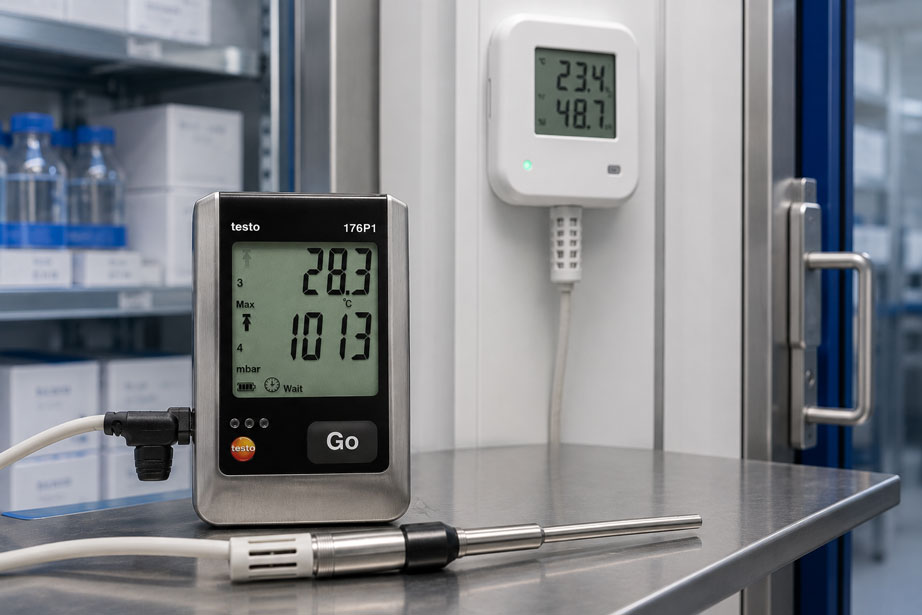
A data logger monitors temperature, humidity, pressure or other quality-relevant measured variables over several weeks. Once the measurement is complete, the data is exported as a CSV file, opened in Excel and stored on a network drive.
The measured values are now stored.
But are they also documented in an audit-ready manner?
Not automatically.
A CSV file often contains only:
- timestamp,
- measured value,
- measurement channel,
- unit, where applicable.
However, significantly more information may be required to ensure reliable data integrity.
For example:
- which logger recorded the data,
- which sensor was connected,
- which user started the measurement,
- which configuration was used,
- whether settings were subsequently changed,
- who evaluated or approved the data,
- whether comments were added,
- whether the system time was changed,
- what the calibration status was at the time of measurement,
- whether the exported dataset is complete.
This is precisely why, in regulated or quality-critical applications, the important question is not only:
“Can the logger store data?”
But rather:
“Can it later be traced where the data came from, whether it is complete, who processed it and what changes were made?”
For pharmaceutical, laboratory, food, quality and validation applications, the entire data chain must therefore be considered:
Sensor → data logger → raw data storage → transfer → software → user → evaluation → approval → export → archive → backup
Data loggers and universal measuring instruments can be found at ICS Schneider under Data Loggers / Universal Measuring Instruments. Solutions for traceable testing and calibration of the measuring equipment used can be found under Calibration Equipment.
Table of Contents
- What does “audit-ready” mean for measurement data?
- Data integrity concerns the entire measurement chain
- ALCOA+ as a fundamental principle for measurement data
- Do not confuse raw data with exported data
- Why metadata belongs to the measured value
- Audit trail: document changes traceably
- Clearly separate user rights and roles
- Electronic signature and approval
- Timestamps, time zones and device clocks
- Document device ID and sensor assignment
- Link calibration status to the measurement data
- Handle subsequent comments correctly
- Checksum and integrity verification
- Why CSV alone is often not sufficient
- Use Excel files in a controlled manner
- Organize export formats appropriately
- Backup is not the same as archiving
- Versioning and change management
- Correctly classify 21 CFR Part 11
- Validate software and the system
- Distinguish between pharmaceutical, food and general quality management applications
- Typical problems in measurement data storage
- Set up an audit-ready data logger workflow
- Practical example: cold room data stored as CSV is insufficient during an audit
- Suitable ICS products
- Conclusion
- FAQ
What does “audit-ready” mean for measurement data?
The term “audit-ready” does not describe a single instrument function.
A data logger does not become audit-ready simply because it:
- has a large storage capacity,
- generates CSV files,
- creates PDF reports,
- is password-protected.
For reliable audit readiness, it must instead be traceable:
- where a dataset originated,
- when it was generated,
- which configuration was used,
- who was able to access the data,
- which changes were made,
- whether the original data is still available,
- whether the dataset is complete,
- whether the measuring equipment was suitable and calibrated at the time of measurement,
- whether the data remains available throughout the required retention period.
Audit readiness therefore results from the combination of:
Measuring equipment + software + user management + work instructions + IT infrastructure + backup + archiving + regular review.
Data integrity concerns the entire measurement chain
When discussing data integrity, people often think only about the subsequent manipulation of a file.
That view is too narrow.
A measured value can also be unreliable even if nobody has ever deliberately modified a file.
Examples include:
- the wrong sensor connected to the logger,
- an incorrectly set device clock,
- the logger accidentally programmed with the wrong measurement interval,
- an uncalibrated sensor being used,
- measured values being truncated during export,
- limit violations being hidden in the report,
- the wrong time zone being used,
- a file being stored under a non-unique name,
- an old and a new version of a report being confused.
Data integrity therefore begins even before the actual measurement.
A typical controlled data chain includes:
- identify the instrument,
- identify the sensor,
- check calibration status,
- approve the measurement configuration,
- start the measurement,
- record raw data,
- transfer raw data,
- verify the transfer,
- evaluate the data,
- comment on deviations,
- review or approve the result,
- archive the raw data and evaluation.
ALCOA+ as a fundamental principle for measurement data
The ALCOA+ principle is frequently used for GxP-relevant data.
ALCOA stands for:
| Principle | Meaning for measurement data |
|---|---|
| Attributable | It must be traceable which user or device created or modified a dataset. |
| Legible | The data must remain readable and interpretable throughout the entire retention period. |
| Contemporaneous | Information should be recorded at the time the respective activity occurs. |
| Original | The original data or a controlled complete copy must be retained. |
| Accurate | The data must be correct and technically reliable. |
With ALCOA+, the following characteristics are also frequently considered:
- Complete: complete,
- Consistent: consistent and logically ordered in time,
- Enduring: permanently retained,
- Available: available throughout the required retention period.
Example
A temperature value:
4.7 °C
alone does not yet meet these principles.
For its evaluation, the following information may additionally be required:
- time: 18.08.2026 08:32:00,
- logger ID: TL-0047,
- sensor ID: PT100-021,
- measuring point: Cold Room 2 / Shelf B,
- measurement interval: 5 min,
- calibration status of the sensor,
- user or configuration,
- unit and measurement channel.
Only the context turns a number into a reliable measurement dataset.
Do not confuse raw data with exported data
A particularly important point is the distinction between raw data and a later export.
For example, the data logger may internally store:
- measured values,
- timestamps,
- device information,
- channel configuration,
- limit status,
- events,
- additional metadata.
When exporting to CSV, only three columns may be generated:
Time | Temperature | Humidity
The CSV file is then a representation or subset of the original dataset.
It is not necessarily identical to the complete electronic raw data.
The safer approach is therefore to retain the original raw data or manufacturer-specific original format in a controlled manner and additionally generate exports from it.
Raw data should not be overwritten
A good data workflow treats the original measurement as an unchanged basis.
Evaluations, comments and reports are built on top of it.
The principle is, for example:
Original dataset → Evaluation V1 → Comment → Approval → Report
and not:
Original dataset → Directly overwrite values → Save new file
Why metadata belongs to the measured value
Metadata describes the context of a dataset.
It answers questions such as:
- When was the measurement taken?
- Which instrument was used?
- Which sensor was used?
- Which unit was used?
- Which measuring range was used?
- How was the instrument configured?
- Who performed the activity?
An export containing only the numerical measured value can therefore lose important information.
Temperature example
The value:
22.4
can hardly be interpreted meaningfully without metadata.
At minimum, the following is required:
22.4 °C | 18.08.2026 08:30 | Logger TL-0047 | Channel 2
Additional information may be required for a regulated application.
Audit trail: document changes traceably
An audit trail documents relevant user actions and changes to the electronic dataset.
A meaningful audit trail can include, for example:
- user,
- date,
- time,
- affected dataset,
- type of action,
- previous state,
- new state,
- reason for the change, where applicable.
Example
A measuring point was originally designated as:
Cold Room 1
and is later corrected to:
Cold Room 1 – Shelf B
An auditable change should not simply display only the new designation.
A traceable record could, for example, be:
18.08.2026 10:42 | User M.Schneider | Measuring point designation changed | old: “Cold Room 1” | new: “Cold Room 1 – Shelf B”
The original information therefore remains traceable.
An audit trail is not the same as a file modification date
A Windows file system may display:
Modified: 18.08.2026 10:42
However, this does not reliably answer:
- who made the change,
- which measured value was affected,
- what was stored previously,
- why the change was made.
A file timestamp therefore does not replace an application-specific audit trail.
Clearly separate user rights and roles
A shared user account:
User: Laboratory
with a password posted on the wall does not allow actions to be uniquely attributed.
For critical applications, users should be uniquely identifiable.
Typical roles may include:
| Role | Typical authorization |
|---|---|
| Operator | Start measurement, view data |
| Evaluator | Evaluate and comment on data |
| Reviewer | Review measurement |
| Approver | Approve or sign results |
| Administrator | Manage users, system parameters and access rights |
The specific division of roles depends on the respective quality process.
Principle of least privilege
A user should only have the rights required for their task.
For example, a normal user generally does not require authorization to:
- delete audit trails,
- create user accounts,
- change the system time,
- remove raw data,
- change system configurations.
Review user accounts regularly
Even a system that was originally configured correctly can become problematic over time.
Typical points for regular user reviews include:
- deactivate accounts of employees who have left the company,
- account for role changes,
- remove temporary accounts,
- review administrator rights,
- avoid shared accounts.
Electronic signature and approval
An electronic signature serves a different purpose from an audit trail.
The audit trail documents actions.
The electronic signature documents, for example:
- who reviewed a dataset,
- when the review took place,
- what the meaning of the signature is.
A typical meaning may be:
- created,
- reviewed,
- approved,
- released.
A typed name is not automatically a controlled electronic signature
A Word or Excel file containing:
Approved by: Max Mustermann
does not by itself constitute a technically controlled signature process.
With a controlled electronic signature, the user’s identity must be controlled and the signature must be permanently linked to the relevant electronic dataset.
Timestamps, time zones and device clocks
With data loggers, the time information is just as important as the measured value itself.
An incorrect timestamp can result in:
- batches being assigned incorrectly,
- temperature deviations being assigned to the wrong process step,
- transport events no longer being traceable,
- two systems no longer being comparable chronologically.
Document the time zone
A timestamp:
18.08.2026 14:00
is not completely unambiguous for international transport if the time zone is unknown.
Useful approaches can include, for example:
2026-08-18 14:00:00 +02:00
or controlled storage in UTC with a clearly defined local display.
Consider daylight saving time changes
For long-term recordings, time changes can result in:
- duplicate times,
- apparent data gaps,
- incorrectly sorted datasets.
The software must be able to handle this in a controlled manner.
Document changes to the system time
It would be particularly problematic if a user could change the device clock without this being traceable later.
For critical applications, it should therefore be defined:
- who is permitted to set the clock,
- how devices are synchronized,
- how time deviations are detected,
- how changes are documented.
Document device ID and sensor assignment
An audit does not concern only the file.
The measuring equipment used must also be uniquely identifiable.
Typical information includes:
- manufacturer,
- device type,
- serial number,
- internal measuring equipment ID,
- connected sensor,
- sensor serial number,
- measuring range,
- measurement channel.
This makes it possible to answer questions later such as:
Which specific sensor measured this temperature deviation?
Device designation alone is often not sufficient
A file named:
Logger1.csv
is problematic if the company has ten identical loggers.
A unique device identification is better.
For example:
DL-TEMP-0047
Link calibration status to the measurement data
Even completely unchanged raw data is of limited value if it is not known whether the measuring instrument used met its calibration requirements at the time of measurement.
A reliable measurement process therefore includes, for example:
- device ID,
- calibration date,
- calibration interval,
- next due date,
- calibration certificate,
- As-Found and As-Left results, where applicable.
The status at the time of measurement is important
Assume:
Measurement: 01.07.2026
Sensor calibration: 15.07.2026
During calibration, it is determined that the sensor was significantly outside its permissible tolerance.
It may then be necessary to evaluate which previous measurements could have been affected by this deviation.
This is precisely why a clear link between measurement data and measuring equipment history is important.
Handle subsequent comments correctly
Subsequent comments are generally useful in quality processes.
For example:
Temperature increase due to scheduled door opening during goods receipt.
It becomes problematic if a comment replaces the original data or retrospectively makes a deviation invisible.
A clean process is:
Measured value remains unchanged → comment is added → user and time are documented
Separate measurement data from interpretation
Example:
Measured value: 9.2 °C
The measured value remains 9.2 °C.
A user can subsequently add:
Comment: Door open from 10:02 to 10:07 due to incoming goods.
The interpretation does not change the original measured value.
Checksum and integrity verification
Checksums can help identify whether data has been altered or corrupted during transfer or storage.
In simplified terms, a verification value is calculated from the contents of a file.
If the file changes, the verification value normally changes as well.
This can be used, for example, to verify:
File in logger → transfer → file in archive
and determine whether the transferred data remained identical.
A checksum does not replace an audit trail
A checksum primarily answers:
Is this file still identical to the verified reference file?
It does not automatically answer:
- who made changes,
- why the change was made,
- what the previous value was,
- whether the user was authorized at all.
Checksums, user management and audit trails therefore serve different purposes.
Why CSV alone is often not sufficient
CSV is a very useful exchange format.
It offers:
- easy readability,
- high compatibility,
- easy further processing,
- import into statistical, laboratory or quality software.
However, CSV normally has no integrated functions for:
- user rights,
- audit trails,
- electronic signatures,
- versioning,
- protection against subsequent modification,
- complete device metadata.
A CSV file can be opened and modified using a text editor or spreadsheet program.
Afterwards, it may still look completely plausible.
CSV can still be used effectively
CSV therefore does not need to be avoided.
Instead, it should be regarded as an export or working format.
For example:
protected raw data + audit trail → CSV export for analysis
and not:
CSV = only available original dataset
Use Excel files in a controlled manner
Spreadsheets are very practical for:
- calculations,
- charts,
- statistics,
- evaluations.
At the same time, uncontrolled use can create data integrity risks.
For example, a user can:
- change a cell,
- delete a row,
- overwrite a formula,
- filter values and then save only part of the data,
- overwrite an older file with a newer one.
Example
Original:
08:30 | 8.9 °C
After manual correction:
08:30 | 5.9 °C
Without a controlled record of changes, it may later no longer be possible to determine that the value was modified.
For quality-critical evaluations, spreadsheets should therefore be used in a controlled, protected and versioned manner.
Organize export formats appropriately
Different file formats serve different purposes.
| Format | Typical purpose |
|---|---|
| Manufacturer-specific raw data format | Retention of the complete original electronic dataset |
| CSV | Data exchange and further calculation |
| PDF/PDF-A | Readable report or long-term representation |
| JSON/XML | Structured data exchange between systems |
For critical applications, it may be useful to retain several formats in parallel.
For example:
Raw data + audit trail + approved PDF report + optional CSV for analysis
The PDF report does not automatically replace the raw data
A PDF is very practical for an auditor because it can be read immediately.
However, it may not contain information that was available in the original electronic system.
For example:
- audit trail entries,
- complete metadata,
- configuration history,
- interactive raw data,
- user information.
It should therefore be clearly defined which dataset is regarded as the original or complete controlled copy in the respective quality process.
Backup is not the same as archiving
Backup and archiving are often treated as the same thing.
However, they serve different purposes.
Backup
A backup should enable operations to be restored after:
- hardware failure,
- accidental deletion,
- IT failure,
- cyberattack,
- storage failure.
Archiving
An archive should retain datasets throughout the defined retention period so that they remain:
- complete,
- readable,
- protected,
- retrievable.
A backup must be tested
The statement:
“We perform a backup every evening.”
is only reliable if it is also verified that the data can actually be restored.
A meaningful backup process therefore includes:
- automated backup,
- monitoring of successful backups,
- separate storage,
- controlled access rights,
- regular restore tests.
Versioning and change management
Evaluations and reports can also change.
For example:
Temperature_Report_V1.pdf
is supplemented after an assessment and subsequently becomes:
Temperature_Report_final_new2.pdf
Such file naming is not reliable version control.
Controlled versioning
A better approach would be, for example:
| Version | Status | Change |
|---|---|---|
| 1.0 | Created | Original evaluation |
| 1.1 | Revised | Comment on deviation added |
| 2.0 | Approved | Review completed |
Again, the important point is:
The underlying raw data does not change as a result.
Correctly classify 21 CFR Part 11
21 CFR Part 11 addresses electronic records and electronic signatures within the scope of FDA requirements.
For electronic records in closed systems, key topics include:
- system validation,
- accurate and complete copies,
- protection of records throughout the retention period,
- limiting access to authorized individuals,
- secure, computer-generated, time-stamped audit trails,
- authority checks,
- documentation and change control.
Additional requirements apply to electronic signatures.
21 CFR Part 11 is not a property of a data logger alone
The statement:
“The logger is Part 11 compliant, so our process is automatically compliant.”
is too simplistic.
Compliance of an electronic records system also depends on:
- software,
- system configuration,
- validation,
- user management,
- standard operating procedures,
- training,
- backup and archiving,
- operational use.
Software can provide functions that support a Part 11-compliant process.
However, the operator must implement and operate these functions correctly.
Not every electronic measurement automatically falls under Part 11
21 CFR Part 11 is not a general regulation for all electronic measurement data worldwide.
Whether Part 11 applies depends in particular on whether the electronic record concerned is subject to the corresponding FDA record requirements.
A German mechanical engineering company using an internal maintenance logger may therefore be subject to different requirements than a pharmaceutical manufacturer maintaining quality-relevant GxP data electronically.
Validate software and the system
Feature-rich software alone is not sufficient for a regulated process.
It must be demonstrable that the system is suitable for its intended purpose.
Risk-based validation or qualification may, for example, consider the following topics:
- user requirements,
- installation,
- user roles,
- measurement data acquisition,
- data transfer,
- audit trail,
- electronic signature,
- export,
- backup,
- restoration,
- error conditions,
- system changes.
Example user requirement
A requirement could be:
The system must prevent a normal operator from deleting or overwriting stored raw data.
The validation should then demonstrate that this requirement is actually met.
Distinguish between pharmaceutical, food and general quality management applications
The required level of data integrity depends on the application and the applicable regulations.
Pharmaceutical and GxP
Particularly stringent requirements may apply to:
- data integrity,
- audit trails,
- user management,
- validation,
- electronic signatures,
- archiving.
Food industry
In the food industry, temperature measurements and HACCP-relevant measured values, for example, must also be documented reliably and traceably.
However, the specific applicable requirements differ from pharmaceutical requirements.
21 CFR Part 11 should therefore not be understood as a general requirement for every food-industry data logger.
ISO 9001 and quality management
Structured measurement data storage can also be useful without GxP.
For example, for:
- test reports,
- complaint processing,
- process records,
- calibration documentation,
- supplier audits,
- internal quality analyses.
The necessary effort should be proportionate to the significance of the data and based on risk.
Typical problems in measurement data storage
| Observation | Risk | Recommended action |
|---|---|---|
| Only the CSV file is stored | Metadata and audit trail may be lost | Additionally archive the raw data format |
| All users work with the same login | Actions cannot be uniquely attributed | Use personalized user accounts |
| Operator has administrator rights | Unnecessary ability to modify the system | Separate roles and rights |
| Raw data can be overwritten | Original state is lost | Use protected or tamper-resistant raw data storage |
| Comments overwrite measured values | Original information is changed | Add comments separately and traceably |
| Device clock can be changed freely | Temporal traceability is compromised | Restrict and document time changes |
| Logger ID is missing from the report | Measurement cannot be uniquely assigned to measuring equipment | Document device and sensor ID |
| Calibration status is unknown | Measurement quality cannot be assessed | Link measuring instrument to measuring equipment management |
| Only a PDF report is available | Electronic raw data or metadata may not be fully available | Retain raw data as well |
| Backup exists but has never been tested | Restoration in an emergency is uncertain | Perform regular restore tests |
| Files are named “final”, “final2”, “final_new” | Versions are not unambiguous | Use controlled versioning |
| Former employees still have access | Unauthorized access is possible | Review user rights regularly |
| Excel file is the only dataset | Formulas and values can be changed without detection | Store original data separately and securely |
| Checksum is regarded as the only protection against manipulation | User actions remain untraceable | Combine checksum with audit trail and access control |
Set up an audit-ready data logger workflow
A systematic procedure is recommended for a traceable measurement process.
- Define the regulatory context: GxP, HACCP, ISO-QM, internal QA or other requirements?
- Classify measurement data: Which data is quality-critical?
- Select measuring instrument: Determine measuring range, accuracy and data functions to suit the task.
- Assign device ID: Uniquely identify the logger.
- Document sensor ID: Clearly assign external sensors.
- Check calibration status: Use only approved measuring equipment.
- Define software: Use suitable data integrity functions for regulated applications.
- Define user roles: Clearly separate operator, reviewer, administrator and approval roles.
- Use personalized accounts: Avoid shared user accounts.
- Define a time concept: Specify time, time zone and synchronization.
- Document measurement configuration: Record measurement interval, channels, limits and start conditions.
- Perform measurement: Record raw data automatically.
- Protect raw data: Do not overwrite the original dataset.
- Control data transfer: Verify completeness and integrity.
- Retain the audit trail: Store relevant changes traceably.
- Perform evaluation separately: Do not overwrite raw data for analysis.
- Comment on deviations: Add comments with user and timestamp.
- Perform review: Review data and relevant audit trail entries.
- Document approval: Use electronic signatures or controlled approval according to the process.
- Generate export: Use PDF/CSV only in addition to the required original dataset.
- Archive data: Retain raw data, metadata and reports in a controlled manner.
- Perform backup: Automate data backup.
- Test restoration: Regularly verify data recovery.
- Review user rights: Periodically recertify permissions.
- Validate system changes: Implement updates and configuration changes in a controlled manner.
Practical example: cold room data stored as CSV is insufficient during an audit
A pharmaceutical storage area is monitored using a temperature and humidity data logger.
The logger records every five minutes:
- temperature,
- relative humidity
.
Step 1: previous process
At the end of the month, an employee reads out the logger.
The data is stored as:
Cold_Room_August_2026.csv
.
The file is then opened in Excel.
A chart is created from the data.
Finally, the file is stored on a shared network drive.
Step 2: audit question
During an audit, the following question is asked:
Who read out the data, and can you prove that no value has been changed since then?
The CSV file itself does not answer this question.
Step 3: further question
The auditor notices that on 12.08. at 14:20 there is a temperature value of:
9.4 °C
.
The auditor asks:
Was this value already present in the original logger dataset, or was it entered manually afterwards?
This question cannot be answered unambiguously from the isolated CSV file either.
Step 4: equipment history
An additional question is asked:
Which specific sensor measured this value, and was that sensor calibrated at the time?
The CSV file does not contain a sensor serial number.
The relationship has to be reconstructed laboriously from other documents.
Step 5: new data workflow
The process is therefore changed.
In future, the following will be stored:
- original electronic raw data,
- device and sensor assignment,
- audit trail information,
- user information,
- approved report,
- CSV only as an additional analysis export.
Step 6: subsequent explanation
The temperature value of 9.4 °C is not changed.
Instead, a traceable comment is added:
12.08.2026 15:10 | User QA-03 | Temperature deviation during documented goods receipt; door open according to access log from 14:17–14:24.
Step 7: review and approval
A second authorized user reviews:
- measurement history,
- limit violation,
- comment,
- device assignment,
- calibration status,
- relevant audit trail entries.
The dataset is then approved in accordance with the defined workflow.
Result
The difference is not that different temperatures are now being measured.
The difference is that it is now possible to trace later:
What was measured → what equipment was used → when was it measured → who processed the data → what was added or changed → who reviewed the results.
Suitable ICS products for audit-ready measurement data acquisition
testo 176 P1 – document pressure, temperature and humidity
The testo 176 P1 offered by ICS is particularly useful for documenting environmental conditions in laboratories and quality-critical areas.
The instrument can:
- measure absolute pressure internally,
- accept external temperature or humidity probes,
- record up to five measured values simultaneously,
- store large measurement series internally.
Different software versions are available for programming, readout and evaluation.
For pharmaceutical applications, the optional:
ComSoft CFR 21 Part 11
is available.
This enables a significantly more controlled data workflow to be established than with a purely manual CSV export.
Further information can be found under testo 176 P1 at ICS Schneider.
testo 176 T4 – multi-channel temperature recording
The testo 176 T4 is suitable for multi-channel temperature measurements using external thermocouples.
Different ComSoft variants are also available for this instrument.
In addition to:
- ComSoft Basic,
- ComSoft Professional
the following can be used for specific pharmaceutical requirements:
ComSoft CFR 21 Part 11
.
This is useful, for example, when temperature recordings are not merely to be analyzed but must also be integrated into a controlled electronic documentation process.
Further information can be found under testo 176 T4 at ICS Schneider.
testo 184 T2 – temperature monitoring during transport
The testo 184 T2 is designed for monitoring temperature-sensitive products during transport.
The instrument offers, among other things:
- internal measurement data storage,
- USB interface,
- automatic PDF report generation,
- alarm indication for limit violations,
- PDF/A reports for long-term readability.
ICS offers the instrument for applications including:
- pharmaceuticals,
- food,
- cold-chain monitoring.
For CFR 21 Part 11 applications, use with the corresponding ComSoft CFR software must be considered.
Further information can be found under testo 184 T2 at ICS Schneider.
ComSoft CFR 21 Part 11 – ensure data integrity before the export stage
Special ComSoft CFR software is available for compatible Testo data loggers.
Functions that are important for regulated applications include:
- audit trail for tracing user activities,
- digital signature,
- storage of raw data in a tamper-protected file format,
- checksums for detecting transfer errors,
- controlled data archiving.
This highlights the decisive difference:
Data integrity does not begin only when the final PDF or CSV report is generated, but already when the original electronic dataset is managed.
Calibration equipment – measurement data requires traceable measuring equipment
A secure electronic data structure does not replace suitable measuring equipment.
The reliability of the measurement dataset still depends on whether the sensor and data logger operate within their permissible measurement uncertainty.
The data integrity strategy should therefore also take the calibration process into account.
At ICS, under Calibration Equipment, you can find solutions including:
- temperature calibration,
- pressure calibration,
- process calibration,
- calibration software,
- traceable measuring equipment management.
Which approach is suitable for which task?
| Application | Recommended approach |
|---|---|
| Simple internal trend measurement without regulatory relevance | Data logger + structured export + controlled backup |
| Long-term measurement relevant to ISO quality management | Unique device ID + calibration status + raw data archive + versioning |
| Pharmaceutical environmental measurement | Suitable logger + validation-capable CFR software + user management + audit trail |
| Temperature and humidity in the laboratory | For example, testo 176 P1 with suitable software |
| Multi-channel temperature recording | For example, testo 176 T4 |
| Pharmaceutical/cold-chain transport | For example, testo 184 T2 with a suitable data workflow |
| Further processing in Excel or statistical software | CSV only as an additional export; retain original data |
| Long-term archiving | Raw data + relevant metadata + audit trail + readable report + backup |
An overview of further measuring instruments can be found under Data Loggers / Universal Measuring Instruments at ICS Schneider.
Conclusion
Storing measurement data in an audit-ready manner means significantly more than saving a CSV file on a network drive.
For quality-critical and regulated applications, the complete data chain must be considered.
This includes:
- sensor,
- data logger,
- device ID,
- calibration status,
- timestamp,
- raw data,
- metadata,
- user rights,
- audit trail,
- electronic approval,
- export,
- archiving,
- backup.
The most important principle is:
The original measurement data should be retained.
Subsequent evaluations and comments are added rather than written into the original measured values.
An audit trail ensures that relevant changes remain traceable.
Personalized user accounts ensure that actions can be attributed to an individual.
Electronic signatures can document review and approval steps.
Checksums can help detect transfer errors or changes to files.
However, none of these functions replaces the others.
A PDF or CSV export alone also does not necessarily represent the complete electronic dataset, including metadata and audit trail.
For 21 CFR Part 11 applications, it is also important to understand:
A suitable data logger or software system can support a compliant process, but it does not replace validation, user management, standard operating procedures and controlled operational use.
The metrological aspect is equally important.
Perfectly protected data from a sensor that measures incorrectly is still incorrect data.
Data integrity and traceable calibration must therefore be considered together.
For practical applications:
Define requirements → uniquely identify logger and sensor → check calibration status → define user rights → document measurement configuration → record raw data securely → retain audit trail → add changes only in a traceable manner → review and approve data → generate additional exports → archive raw data and metadata → regularly test backup and restore.
FAQ: Store measurement data in an audit-ready and traceable manner
What does audit-ready measurement data storage mean?
It refers to a data process in which measured values, origin, time, user actions and relevant changes remain traceable throughout the required retention period.
Is a CSV file sufficient for an audit?
Not necessarily. A CSV file can transport measured values but often does not contain complete metadata, user information or audit trail data.
Can I export measurement data as CSV?
Yes. CSV is a very practical exchange format. For critical applications, however, the CSV export should be retained in addition to the protected electronic raw data.
What is raw data from a data logger?
Raw data consists of the original electronic records of the measuring system together with the information or metadata required for their interpretation.
Can I subsequently correct raw data?
The original data should generally be retained. Necessary corrections or explanations should be added traceably and documented accordingly.
What is an audit trail?
An audit trail is a chronological electronic record of relevant user actions and changes, for example including user, date and time.
Can a user delete the audit trail?
In a controlled system, the audit trail should be protected against unauthorized modification or deletion and retained in accordance with the requirements of the respective process.
What should an audit trail contain?
Typically, user, date, time, action and affected dataset. Depending on the system and process, the previous state, new state and reason for the change may also be documented.
Why are personal user accounts important?
Only then can actions be uniquely attributed to an individual. Shared accounts make this traceability difficult or impossible.
What does a role and authorization concept mean?
Users receive different permissions according to their tasks, for example operator, reviewer, approver or administrator.
Should operators have administrator rights?
Unnecessary administrator rights should be avoided in critical systems. Users should only receive the permissions they require for their tasks.
What is an electronic signature?
An electronic signature is used to uniquely associate an electronic approval or declaration with a user and the relevant dataset.
Is a typed name an electronic signature?
A simply typed name does not automatically meet the requirements of a controlled electronic signature process.
Why is the device ID important?
It enables a measurement dataset to be uniquely assigned to the data logger actually used.
Does the sensor also need to be identified?
This is particularly useful for external or interchangeable sensors because accuracy and calibration status may depend on the specific sensor.
Why is calibration status part of data integrity?
Measurement data must not only be stored completely but must also be metrologically reliable. It must therefore be traceable whether the measuring equipment used was properly calibrated at the time of measurement.
What do As-Found and As-Left mean?
As-Found describes the condition of a measuring instrument before any possible adjustment. As-Left documents the condition after adjustment or completion of the calibration.
Why is the device clock important?
An incorrect timestamp can assign measured values to the wrong process, batch or event.
Should the time zone be stored?
For international or cross-system measurements, a clearly defined time zone policy is very useful so that timestamps can be interpreted unambiguously.
What happens when daylight saving time changes?
Depending on the system, duplicate or apparently missing times may occur. It should therefore be defined how the system handles time zones and daylight saving time.
What is a checksum?
A checksum is a verification value calculated from data. It can, for example, help determine whether a file was changed or corrupted during transfer.
Is a checksum an audit trail?
No. A checksum can verify the integrity of a file but does not automatically document the user, action, time and reason for a change.
Is a PDF report sufficient as the original dataset?
Not necessarily. A PDF can provide a very good readable representation but may not contain all electronic raw data, metadata and audit trail information.
What is PDF/A?
PDF/A is a PDF variant designed particularly for long-term electronic archiving. However, a PDF/A document also does not automatically replace the complete raw data of a measuring system.
Why is Excel alone often not sufficient?
Values, formulas and rows can easily be changed in a normal spreadsheet. Without additional controls, it may not be possible to trace what was changed.
Can Excel still be used for evaluation?
Yes. Evaluation can be useful as long as the original controlled dataset is retained and the Excel processing is controlled according to the significance of the data.
What is the difference between a backup and an archive?
A backup is primarily intended for recovery after data loss. An archive is intended for the controlled long-term retention of datasets.
Why does a backup have to be tested?
Only a successful restoration test demonstrates that the backed-up data can actually be made available again in an emergency.
What does versioning mean?
Versioning ensures that different revision states of a report or evaluation can be clearly distinguished and traced.
What does ALCOA mean?
ALCOA stands for Attributable, Legible, Contemporaneous, Original and Accurate.
What does ALCOA+ mean?
In addition, Complete, Consistent, Enduring and Available are considered in particular – meaning data that is complete, consistent, permanently retained and available.
What is 21 CFR Part 11?
21 CFR Part 11 contains FDA requirements for certain electronic records and electronic signatures.
Does every data logger have to comply with 21 CFR Part 11?
No. Whether Part 11 is relevant depends on the regulatory context and the electronic records for which the data logger is used.
Is a Part 11-capable logger automatically compliant?
No. Software configuration, system validation, user management, standard operating procedures, training and data archiving must also fit the regulatory process.
What does validation-capable software mean?
Validation-capable software provides functions and documentation options that enable the operator to demonstrate the suitability of the system for its intended regulated process.
What is ComSoft CFR 21 Part 11?
ComSoft CFR is software for compatible Testo data loggers designed for pharmaceutical applications and 21 CFR Part 11 requirements and provides functions including audit trails and digital signatures.
Which ICS data logger is suitable for temperature, humidity and absolute pressure?
The testo 176 P1 measures absolute pressure and can additionally be used with external temperature/humidity probes. ComSoft CFR 21 Part 11 is optionally available for pharmaceutical applications.
Which logger is suitable for multi-channel temperature measurements?
The testo 176 T4 is suitable for multi-channel temperature recording using external thermocouples and can be used with different ComSoft software versions.
Which data logger is suitable for pharmaceutical and refrigerated transport?
The testo 184 T2 is designed for temperature monitoring during transport and, among other things, automatically generates a PDF report after readout.
What should I be able to provide at minimum during an audit?
Depending on the regulatory process, raw data, device and sensor assignment, relevant metadata, calibration status, audit trail information, user or approval data and the associated reports should be available.
How do I start setting up an audit-ready data logger structure?
First, the regulatory requirements and data criticality should be defined. Measuring instruments, software, user roles, storage structure, audit trail review, backup and archiving are then defined according to the associated risk.
Where can I find data loggers at ICS Schneider?
An overview can be found under Data Loggers / Universal Measuring Instruments at ICS Schneider.
Where can I find calibration equipment at ICS Schneider?
An overview can be found under Calibration Equipment at ICS Schneider.